
Stop keeping three copies of the same photo.
Go Cleanup finds duplicate and similar photos, videos, and screenshots, tidies up messy contacts, and clears out your inbox — scanned entirely on your phone. Nothing leaves your device unless you tell it to.
Free to start · no sign-up required · iOS & Android
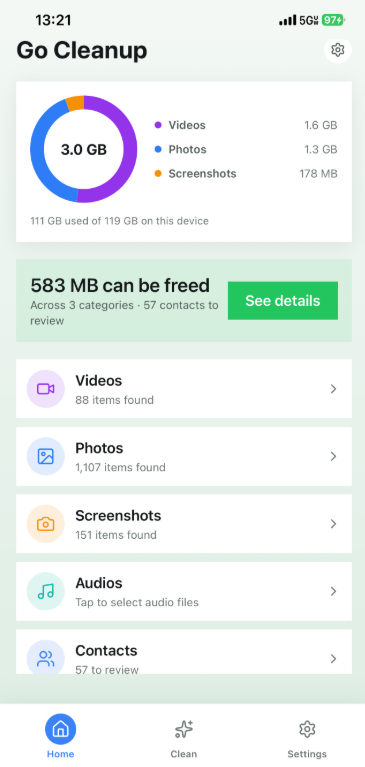
Everything crowding your storage, sorted.
Go Cleanup groups what it finds by category, so you always see what's about to change before you confirm it.
Duplicate & similar photos
Exact duplicates and near-identical burst shots, grouped side by side so you keep the best one.
Screenshots
The ones you took for a reason two months ago and never looked at again.
Duplicate videos
Videos quietly eat the most space of anything on your phone — find the copies first.
Duplicate audio
Voice memos and audio files you downloaded twice without realizing it.
Duplicate & incomplete contacts
Merge duplicate entries, and clean up contacts missing a name, a number, or formatted oddly.
Email cleanup
Connect Gmail or Outlook to bulk-clear promotions and unsubscribe from senders in one pass.
From cluttered to clean in a few taps.
Scan
Go Cleanup looks at your photos, videos, screenshots, contacts, and — if you connect it — your inbox. All of it stays on your device.
Review
Every group is laid out for comparison before anything changes. Nothing is ever deleted automatically.
Free up space
Delete or merge with one tap. Everything lands in a 30-day recycle bin first, just in case you change your mind.
Try it free. Go unlimited when you're ready.
Free plan users get a daily allowance in every category — enough to see real results before deciding to upgrade.
Billed via the App Store or Google Play. Cancel anytime from your device's account settings.
We built this to need less of your data, not more.
Every photo, video, audio file, and contact scan runs on your phone's own photo and contacts frameworks — no upload, no server copy, no exceptions.
Your provider's own sign-in if you connect a mailbox, and an entitlement check with the App/Play Store if you're on Pro. No crash logs or usage analytics are collected today.
Read the full Privacy Policy and Terms of Service.
Frequently asked questions.
Does Go Cleanup upload my photos, videos, or contacts?
No. Every scan runs entirely on your device using your phone's own photo and contacts frameworks. Nothing is uploaded or stored on our servers.
What happens when I delete something?
Deleted items move to a recycle bin (or your device's own "Recently Deleted" album on iOS) for the retention period you choose in Settings — 7, 14, or 30 days — before they're permanently removed. Merged contacts work the same way: the extra entries go to the bin, not straight to deletion.
What's the difference between Free and Pro?
Free lets you clean up to 3 items every 24 hours in each of photos, similar photos, screenshots, videos, and audio; up to 15 emails a day; 1 contact merge a day (no "Merge all"); and up to 3 incomplete-contact fixes a day per issue type. It also shows ads. Pro removes every daily limit, unlocks "Merge all" for contacts, and removes ads entirely.
How do I cancel or manage my subscription?
Subscriptions are billed and managed entirely through your Apple ID account settings (App Store) or your Google Play account settings — not inside the app. Deleting the app doesn't cancel your subscription.
I already paid for Pro — how do I restore it?
Open the paywall in the app and tap Restore. If you're signed into the same Apple ID or Google account you subscribed with, your Pro access comes back at no extra charge.
Why am I seeing ads?
Ads only show on the Free plan, supplied by Google AdMob, when you return to Home, Clean, or Settings. Upgrading to Pro removes them.
What happens if I say no to photo or contacts access?
You can still use the parts of the app that don't need it. You can grant access later at any time from your device's system settings.
Is my email read or stored by Go Cleanup?
Only if you choose to connect an account. The app talks directly to Gmail or Outlook using their own sign-in process — we don't run a mail server or keep a copy of your messages.
Where can I read the full legal details?
See our Terms of Service and Privacy Policy.
See what's actually taking up space.
Free to start. Takes less than a minute to run your first scan.
No account required · Free plan available forever